 Ride Quest
A Disney World trip planner the whole family can use
Plan flights, hotels, wish lists, each park day and the packing in one app with everyone who's coming. Ride Quest keeps the whole group on the same page, from the first idea to the last ride.

- Free to plan
- Shared with everyone on the trip
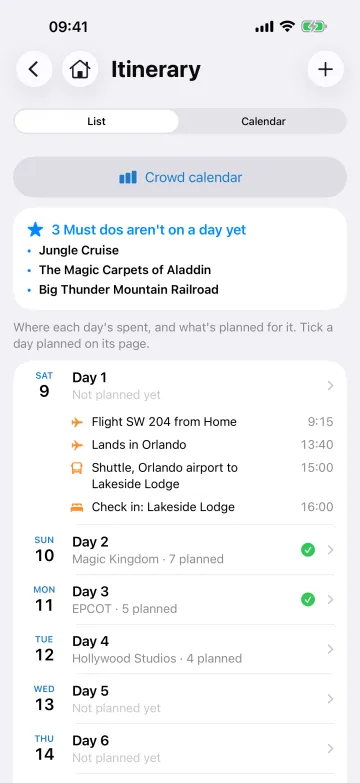
How to plan a Disney World trip step by step
A Walt Disney World holiday has a lot of moving parts: four theme parks, two water parks, dozens of restaurants, booking windows that open weeks ahead, and a group of people who all want different things. Here's how to plan it without the spreadsheet, and how Ride Quest helps at each step.
1. Pick your dates and who's coming
Start with the dates and the people. In Ride Quest you add everyone on the trip, including children and grandparents without an iPhone, with their heights, so the app can tell you which rides each person can go on. Give the trip a cover photo and you'll see the countdown every time you open the app.
2. Add your flights, transfers and hotel
Set the trip up a step at a time: each flight (search any airport or airline), drive or transfer, each hotel stay and the way home. Keep boarding passes, tickets and confirmations with each step, locked with Face ID and available offline. If you're travelling from abroad, Ride Quest tells you whether you're likely to need an ESTA or visa from your nationality and where you fly from.
3. Find out what everyone wants to do
This is where most plans go wrong: one person plans the days, and someone's favourite ride gets left out. In Ride Quest everyone swipes through the rides, shows and restaurants and answers Want to, Must do, Don't mind or No thanks. You'll see what everyone wants, what two or more of you share, and each person's Must dos, flagged with heights and any closures on your dates.
4. Know when booking opens
Dining reservations and paid ride reservations open on set days before your trip, and the popular ones go quickly. The itinerary shows what's still to book and the days bookings open, and Ride Quest can remind you, so you're ready when the window opens. Bookings already in Apple Wallet get a mark in the plan.
5. Plan each park day
Choose a park for each day, then drop rides, meals and shows into the morning, afternoon and evening, starting with the Must dos. Add your dining bookings with their times and confirmation numbers. Put the plan in Apple Calendar if you like it there. On the day, a Today card leads the app with the plan and live waits, ticking off as you go.
6. Pack and share the lists
Make packing, shopping and to-do lists for everyone or for one person, with reminders. Plan outfits for each day with photos and they're added to the packing list. Need ideas? Start from our Disney World packing list.
Plan your trip together in Ride QuestFree on iPhone. No account needed.
The trip, the wishes and the day
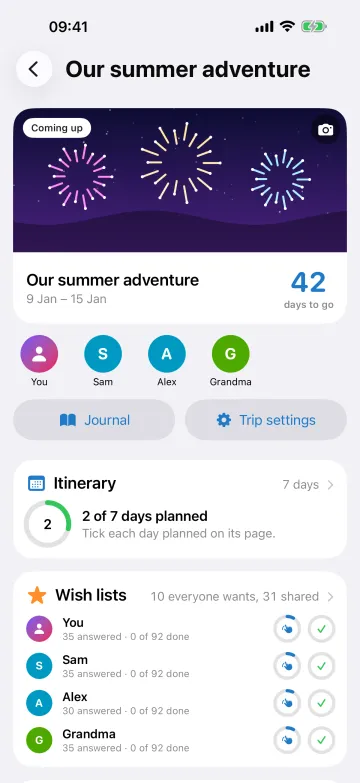
The trip's page
The countdown, who's coming, the itinerary and everyone's wish lists in one place.
Swipe wish lists
One card at a time, showing the ride's height, thrills and who has already made it a Must do.
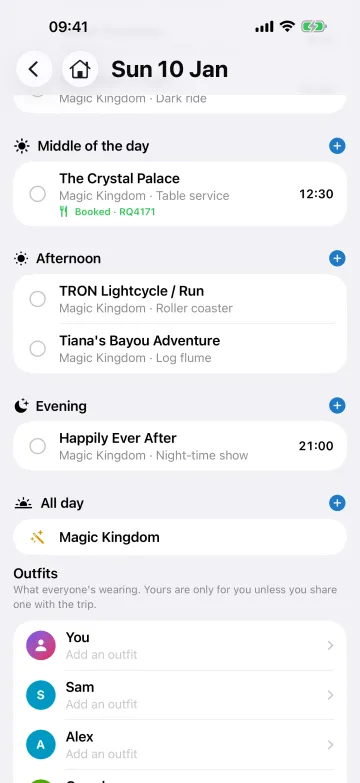
Plan each day
Morning, afternoon and evening plans with bookings and times, ticked off as you go.
More guides
Good to know
Can everyone on the trip help plan?
Yes. Invite them in Messages or with a QR code and add them to the trip. The trip, its wish lists and its lists are shared with everyone on it, and each person swipes their own wish list.
What about children and grandparents without an iPhone?
Add them to the trip as people you look after. They get wish lists, heights and packing of their own, and with Family two grown-ups can look after them from both their iPhones.
Does Ride Quest book anything?
No. Ride Quest is where your group plans. You book tickets, dining and ride reservations with Disney as usual, and Ride Quest reminds you when booking opens and keeps the confirmation with the plan.
Is the trip planner free?
Yes. Setting up the trip, the itinerary, travel documents, lists and wish lists (the first 10 answers) are free. Ride Quest Plus, a one-time purchase, adds each day's plan, Must dos, outfits, wish lists past the first 10 answers and logging the parks.

Start planning your trip tonight
Free on iPhone. No account, no ads, no tracking.
 On your computer?Scan with your iPhone's camera